Command line
Besides the web service, BlackVue Sync v2 has a command line for one-off syncs and for cron jobs. It takes the same options as the original BlackVue Sync, so an existing cron line only needs the new command name.
The command line does not read settings.json; everything is passed as
options.
Installing the command
With pip
python3 -m venv ~/blackvuesync-v2-venv
~/blackvuesync-v2-venv/bin/pip install "git+https://github.com/tekgnosis-net/blackvuesync-v2@v3.0.0"
~/blackvuesync-v2-venv/bin/blackvuesync-v2 --version
With uv
uv tool install "git+https://github.com/tekgnosis-net/blackvuesync-v2@v3.0.0"
blackvuesync-v2 --version
With Docker
docker run --rm -v /data/dashcam:/recordings \
    ghcr.io/tekgnosis-net/blackvuesync-v2:3 \
    sync dashcam.example.net --destination /recordings --dry-run
Requires Python 3.9 or newer. The command is blackvuesync-v2; the upstream
package on PyPI provides a different blackvuesync command, and both can be
installed side by side.
Checking the dashcam
The examples use dashcam.example.net; a numeric IP address works as well.
A dashcam that is online answers:
$ curl http://dashcam.example.net/blackvue_vod.cgi
v:1.00
n:/Record/20181026_135003_PF.mp4,s:1000000
n:/Record/20181026_140658_PF.mp4,s:1000000
...
Running a sync
The dashcam address is the only required argument. --dry-run shows what
would happen without downloading or deleting anything:
blackvuesync-v2 dashcam.example.net --dry-run
blackvuesync-v2 <address> ... is short for
blackvuesync-v2 sync <address> .... blackvuesync-v2 serve starts the web
service instead.
A typical invocation downloads into /data/dashcam and keeps two weeks:
blackvuesync-v2 dashcam.example.net --destination /data/dashcam --keep 2w
Options
| Option | Description |
|---|---|
--destination DIR |
Where recordings are stored. Default: the current directory. |
--keep PERIOD |
Deletes recordings older than this. Units d (days) and w (weeks); no unit means days. |
--grouping SCHEME |
Stores recordings in date folders: daily (2018-10-26), weekly (Monday's date), monthly (2018-10), yearly (2018), or none (default). Grouping speeds up the BlackVue Viewer app. |
--priority ORDER |
date oldest first (default), rdate newest first, type manual, then events, normal and parking. |
--max-used-disk PERCENT |
Stops downloading when the destination disk is this full. Default 90. |
--timeout SECONDS |
Connection timeout. Default 10.0. |
--retry-failed-after PERIOD |
Waits this long before retrying a failed download. Units s, h, d, w. Default 1d. |
--skip-metadata TYPES |
Skips t thumbnails (.thm), 3 accelerometer (.3gf), g GPS (.gps); e.g. t3g downloads video only. |
--include CODES |
Downloads only these recording codes, comma-separated (see below), e.g. P,NF. |
--exclude CODES |
Skips these codes; wins over --include, e.g. --include N,E --exclude NR. |
--cron |
Logs only downloads and unexpected errors; an unreachable dashcam is silent. |
--quiet |
Errors only. Wins over --verbose. |
--verbose |
More detail; repeat for more. |
--log-format FORMAT |
text (default) or json. |
--dry-run |
Shows what would happen without doing it. |
--metrics-file PATH |
Writes Prometheus metrics to this file. |
--metrics-pushgateway-url URL |
Pushes Prometheus metrics to this Pushgateway. |
--metrics-job NAME |
Pushgateway job label. Default blackvuesync. |
--metrics-instance NAME |
Pushgateway instance label. Default: the dashcam address. |
--metrics-state-file PATH |
Where metrics state is kept. Default .blackvuesync.metrics-state.json in the destination. |
Run blackvuesync-v2 sync --help for the full list.
Recording codes
A code is a type letter, optionally followed by a camera direction letter.
| Type | Meaning | Type | Meaning |
|---|---|---|---|
N |
Normal | A |
Acceleration |
E |
Event | T |
Cornering |
P |
Parking | B |
Braking |
M |
Manual | R, X, G |
Geofence |
I |
Impact | D, L, Y, F |
Driver monitoring |
O |
Overspeed |
Directions: F front, R rear, I interior, O optional.
Running from cron
*/15 * * * * /home/media/.local/bin/blackvuesync-v2 dashcam.example.net --keep 2w --destination /data/dashcam --cron
--cron keeps the output quiet unless something was downloaded or went
wrong, so cron only emails you after a drive or on a real problem. An
unreachable dashcam is expected when the car is away and produces no output.
Overlapping runs are safe: a lock file in the destination
(.blackvuesync.lock) lets only one sync run at a time. It is the same lock
the original BlackVue Sync uses. The destination must be on a local
filesystem for the lock to work.
Do not combine a cron job with the web service on the same destination: the lock keeps them from colliding, but the web interface only shows its own runs.
NAS schedulers
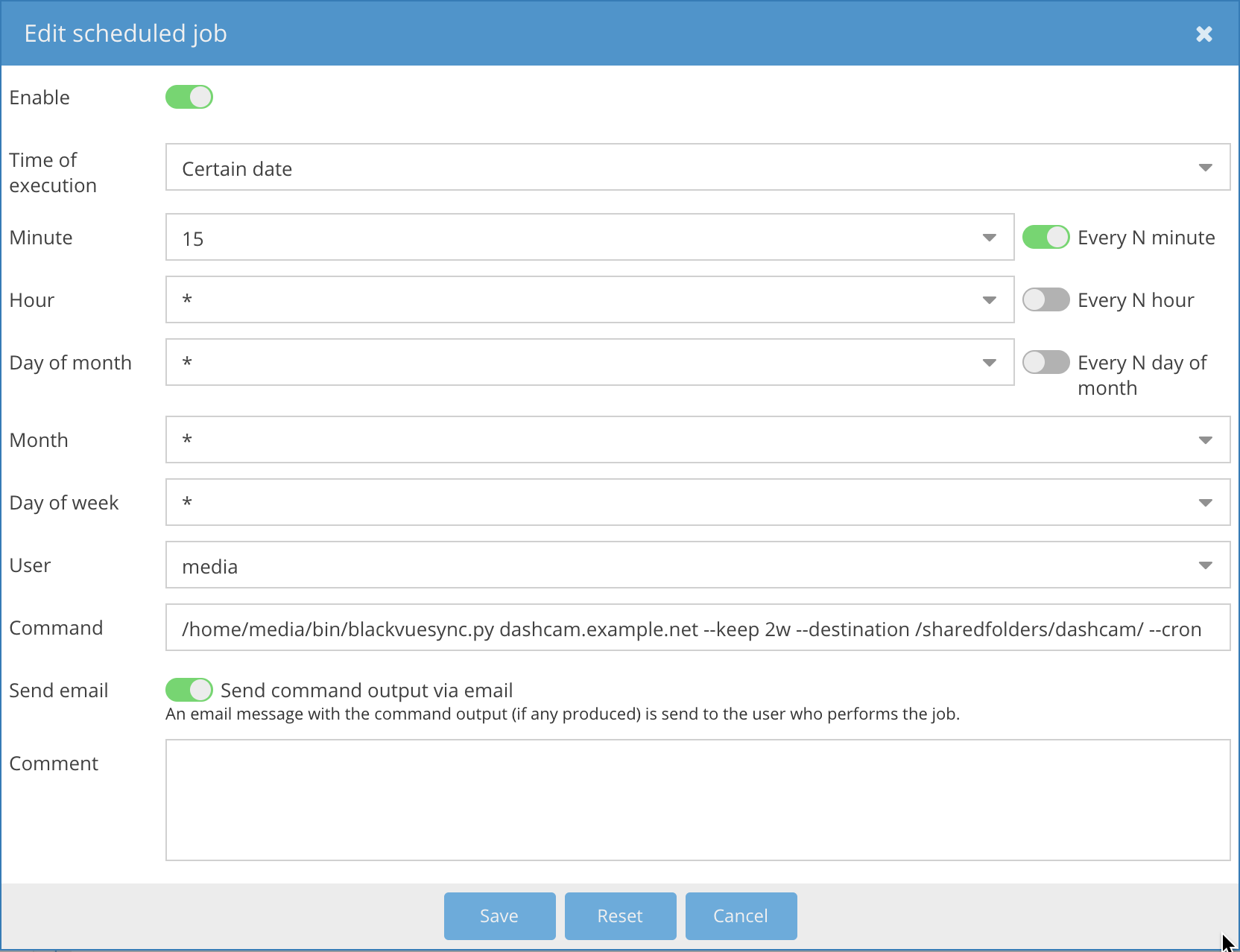
Most NAS systems can run a command on a schedule. For example, openmediavault scheduled jobs support email notifications:
Prometheus metrics
Each run can emit Prometheus text-format metrics. Write them for node_exporter's textfile collector:
blackvuesync-v2 dashcam.example.net --destination /data/dashcam --cron \
    --metrics-file /var/lib/node_exporter/textfile_collector/blackvuesync.prom
Or push them to a Pushgateway, e.g. from a Kubernetes CronJob:
blackvuesync-v2 dashcam.example.net --destination /data/dashcam --cron \
    --metrics-pushgateway-url http://pushgateway.monitoring.svc:9091
Metrics are opt-in. A delivery failure is logged as a warning and does not
change the sync's exit status. Metric names keep the blackvuesync_ prefix
of the original project, so existing dashboards keep working. Run-level
failures appear as blackvuesync_last_run_failure{reason="..."} and per-file
failures as blackvuesync_file_download_failures_last_run{reason="..."}.
Useful alerts:
blackvuesync_last_run_success == 0
blackvuesync_last_run_failure{reason=~"network|timeout"} == 1
time() - blackvuesync_last_run_timestamp_seconds > 3600
time() - blackvuesync_last_successful_file_pull_timestamp_seconds > 86400
sum(max_over_time(blackvuesync_file_download_failures_last_run[1h])) > 0
The web service writes the same metrics after every scheduled run when Settings → Metrics is configured.